![fit3d_logo.png]](https://service.fit3d.com/hs-fs/hubfs/fit3d_logo.png?height=40&name=fit3d_logo.png)
Create a private, well-lit space that allows participants to complete a clear 360-degree scan.
A properly prepared scan room helps SNAP capture the participant’s visible body shape consistently.
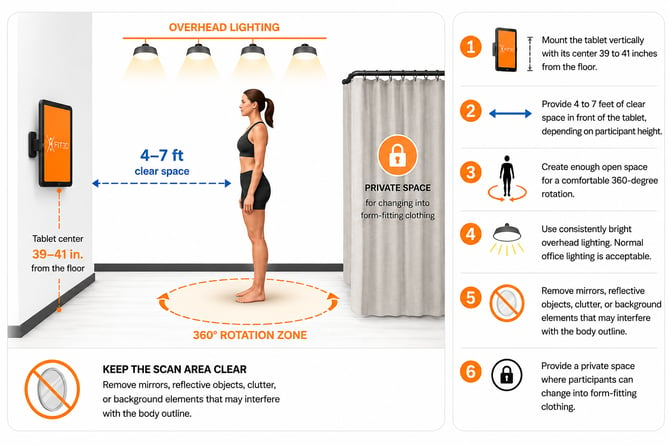
1. Mount the Tablet Vertically
Mount the tablet in portrait orientation with the center of the screen 41 inches from the floor. Make sure that the power port if facing down
(NOTE: Scanning will fail if the tablet is upside down. Please make sure the charging port is facing down).
Use a stable wall mount or floor stand that will not move during scanning.
2. Provide Enough Scanning Distance
Leave 4 to 7 feet of clear space between the tablet and the participant.
Taller participants may need to stand farther from the tablet so their full body remains visible on the screen.
3. Create a Clear Rotation Area
Provide enough open space for the participant to complete a comfortable 360-degree rotation without stepping around furniture or other obstacles.
A floor marker can help participants return to the same scanning position.
4. Use Bright, Consistent Lighting
Use bright overhead lighting that illuminates the participant evenly.
Normal office lighting is usually acceptable.
Avoid:
- Strong light directly behind the participant
- Dark shadows across the body
- Lighting that changes during the scan
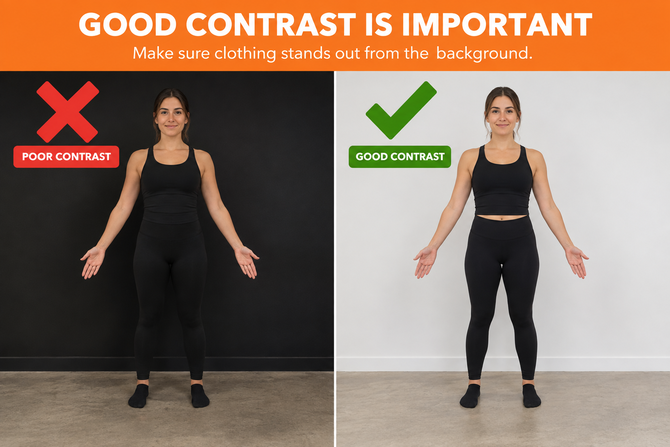
(NOTE: Good contrast between the user & the background is important. If someone's clothes match the background, the scans may fail. ).
5. Keep the Background Clear
Remove anything that may interfere with the participant’s visible body outline, including:
- Mirrors
- Reflective objects
- Furniture near the scanning area
- Hanging clothing
- Exercise equipment
- Visual clutter
The area behind the participant should remain as simple and consistent as possible.
6. Protect Participant Privacy
Provide a private area where participants can change into form-fitting clothing and complete the scan comfortably.
Staff may assist with the participant’s first scan, but the room should allow participants to scan privately once they understand the process.
[Learn How Participants Should Prepare for a SNAP Scan]
Scan Room Checklist
Before scanning, confirm:
- Tablet is mounted vertically (power port facing the floor)
- Screen center is 41 inches from the floor
- Participant has 4 to 7 feet of clear distance
- There is enough space for a full rotation
- Lighting is bright and consistent
- Mirrors and reflective objects are removed
- The background is clear
- A private changing area is available
Email help@fit3d.com and include a photo of your proposed scanning area. Our team can help identify potential setup issues.